

Are you a great Chrome user? That’s nice to hear. But first, consider whether or not there are any essential Chrome extensions you are currently missing from your browsing life, so here we’re going to share with you 10 Best Chrome Extensions That Are Perfect for Everyone. So Let’s Start.
1. LastPass
When you have too several passwords to remember, LastPass remembers them for you.
This chrome extension is an easy way to save you time and increase security. It’s a single password manager that will log you into all of your accounts. you simply ought to bear in mind one word: your LastPass password to log in to all or any your accounts.
Features
- Save usernames and passwords and LastPasswill log you in automatically.
- Fill the forms quickly to save your addresses, credit card numbers and more.
2. MozBar
MozBar is an SEO toolbar extension that makes it easy for you to analyze your web pages’ SEO while you surf. You can customize your search so that you see data for a particular region or for all regions. You get data such as website and domain authority and link profile. The status column tells you whether there are any no-followed links to the page.You can also compare link metrics. There is a pro version of MozBar, too.
3. Grammerly
Grammarly is a real-time grammar checking and spelling tool for online writing. It checks spelling, grammar, and punctuation as you type, and has a dictionary feature that suggests related words. if you use mobile phones for writing than Grammerly also have a mobile keyboard app.
4. VidlQ
VidIQ is a SaaS product and Chrome Extension that makes it easier to manage and optimize your YouTube channels. It keeps you informed about your channel’s performance with real-time analytics and powerful insights.
Features
- Learn more about insights and statistics beyond YouTube Analytics
- Find great videos with the Trending tab.
- You can check out any video’s YouTube rankings and see how your own video is doing on the charts.
- Keep track the history of the keyword to determine when a keyword is rising or down in popularity over time.
- Quickly find out which videos are performing the best on YouTube right now.
- Let this tool suggest keywords for you to use in your title, description and tags.
5. ColorZilla
ColorZilla is a browser extension that allows you to find out the exact color of any object in your web browser. This is especially useful when you want to match elements on your page to the color of an image.
Features
- Advanced Color Picker (similar to Photoshop’s)
- Ultimate CSS Gradient Generator
- The “Webpage Color Analyzer” site helps you determine the palette of colors used in a particular website.
- Palette Viewer with 7 pre-installed palettes
- Eyedropper – sample the color of any pixel on the page
- Color History of recently picked colors
- Displays some info about the element, including the tag name, class, id and size.
- Auto copy picked colors to clipboard
- Get colors of dynamic hover elements
- Pick colors from Flash objects
- Pick colors at any zoom level
6. Honey
Honey is a chrome extension with which you save each product from the website and notify it when it is available at low price it’s one among the highest extensions for Chrome that finds coupon codes whenever you look online.
Features
- Best for finding exclusive prices on Amazon.
- A free reward program called Honey Gold.
- Searches and filters the simplest value fitting your demand.
- Instant notifications.
if (typeof atAsyncOptions !== ‘object’) var atAsyncOptions = [];
atAsyncOptions.push({
‘key’: ‘adee9769ea74eb59e82d4f0cb2e6f816’,
‘format’: ‘js’,
‘async’: true,
‘container’: ‘atContainer-adee9769ea74eb59e82d4f0cb2e6f816’,
‘params’ : {}
});
var script = document.createElement(‘script’);
script.type = “text/javascript”;
script.async = true;
script.src = ‘http’ + (location.protocol === ‘https:’ ? ‘s’ : ”) + ‘://www.topcreativeformat.com/adee9769ea74eb59e82d4f0cb2e6f816/invoke.js’;
document.getElementsByTagName(‘head’)[0].appendChild(script);
7. GMass: Powerful Chrome Extension for Gmail Marketers
GMass (or Gmail Mass) permits users to compose and send mass emails using Gmail. it is a great tool as a result of you’ll use it as a replacement for a third-party email sending platform. you will love GMass to spice up your emailing functionality on the platform.
8. Notion Web Clipper: Chrome Extension for Geeks
It’s a Chrome extension for geeks that enables you to highlight and save what you see on the web.
It’s been designed by Notion, that could be a Google space different that helps groups craft higher ideas and collaborate effectively.
Features
- Save anything online with just one click
- Use it on any device
- Organize your saved clips quickly
- Tag, share and comment on the clips
If you are someone who works online, you need to surf the internet to get your business done. And often there is no time to read or analyze something. But it’s important that you do it. Notion Web Clipper will help you with that.
9. WhatFont: Chrome Extension for identifying Any Site Fonts
WhatFont is a Chrome extension that allows web designers to easily identify and compare different fonts on a page. The first time you use it on any page, WhatFont will copy the selected page.It Uses this page to find out what fonts are present and generate an image that shows all those fonts in different sizes. Besides the apparent websites like Google or Amazon, you’ll conjointly use it on sites wherever embedded fonts ar used.
10. SimilarWeb: Traffic Rank & Website Analysis Extension
Similar Web is an SEO add on for both Chrome and Firefox.It allows you to check web site traffic and key metrics for any web site, as well as engagement rate, traffic ranking, keyword ranking, and traffic source. this is often a good tool if you are looking to seek out new and effective SEO ways similarly as analyze trends across the web.
Features
- Discover keyword trends
- Know fresh keywords
- Get benefit from the real traffic insights
- Analyze engagement metrics
- Explore unique visitors data
- Analyze your industry‘s category
- Use month to date data
How to Install chrome Extension in Android
I know everyone knows how to install extension in pc but most of people don’t know how to install it in android phone so i will show you how to install it in android
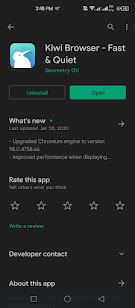
1. Download Kiwi browser from Play Store and then Open it.
Advertisement
Continue reading below
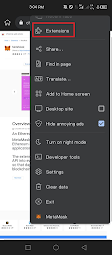
2. Tap the three dots at the top right corner and select Extension.
3. Click on (+From Store) to access chrome web store or simple search chrome web store and access it.
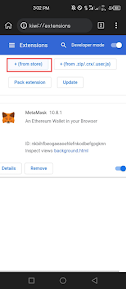
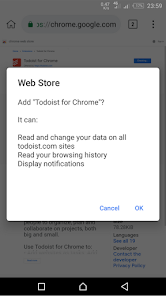
4. Once you found an extension click on add to chrome a message will pop-up asking if you wish to confirm your choice. Hit OK to install the extension in the Kiwi browser.
5. To manage extensions on the browser, tap the three dots in the upper right corner. Then select Extensions to access a catalog of installed extensions that you can disable, update or remove with just a few clicks.
Your Chrome extensions should install on Android, but there’s no guarantee all of them will work. Because Google Chrome Extensions are not optimized for Android devices.
Final Saying
We hope this list of 10 best chrome extensions that is perfect for everyone will help you in picking the right Chrome Extensions. We have selected the extensions after matching their features to the needs of different categories of people. Also which extension you like the most let me know in the comment section